---
title: Configure itens cobrados de acordo com o peso
description: Aprenda como configurar e gerenciar pedidos de venda por peso na OlaClick. Otimize o atendimento do seu negócio com pesagem precisa e integração direta no sistema.
---
[Pular para o conteúdo](https://help.olaclick.com/pt-br/help/pedidos-de-venda-por-peso#main-content)
Português - Brasil
Mostrar submenu para traduções
[](https://help.olaclick.com/pt-br/help?hsLang=pt-br)
Abrir navegação principal
Fechar navegação principal
- Português - Brasil
Mostrar submenu para traduções
- [Sugestão de melhoria](https://clientesolaclick.canny.io/sugestoes)
[Sugestão de melhoria](https://clientesolaclick.canny.io/sugestoes)
Olá, como podemos te ajudar?
- Não há sugestões porque o campo de pesquisa está em branco.
1. [Central de Ajuda](https://help.olaclick.com/pt-br/help?hsLang=pt-br)
2. [Pedidos](https://help.olaclick.com/pt-br/help/pedidos?hsLang=pt-br)
# Configure itens cobrados de acordo com o peso
## Crie pedidos por peso para refeições e itens a granel
**Passo 1:**
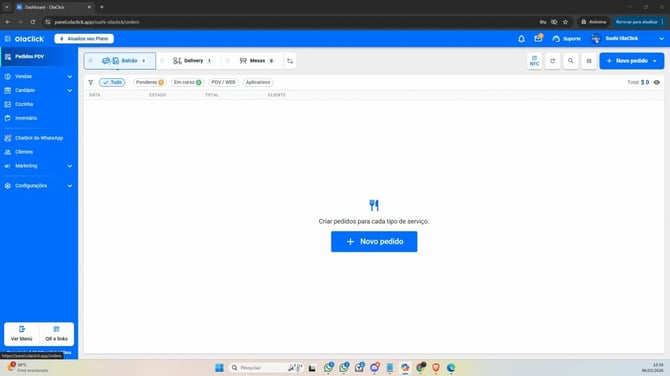
Acesse o módulo de **mesas**.
**Passo 2:**
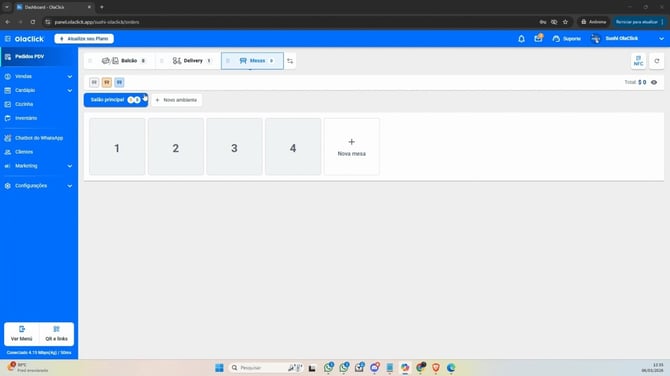
Clique em **Mesas**, selecione a mesa desejada.
**Passo 3:**
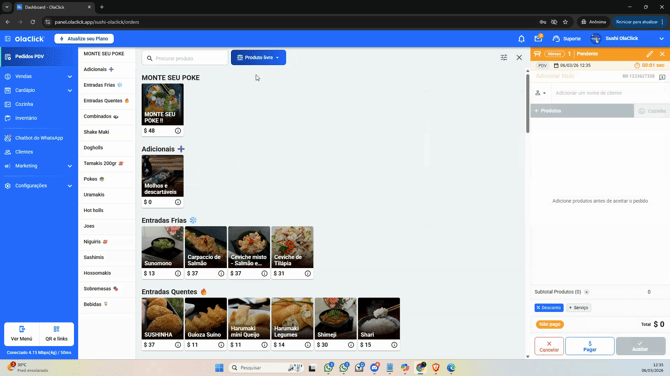
Clique em **Produto Livre**.
**Passo 4:**
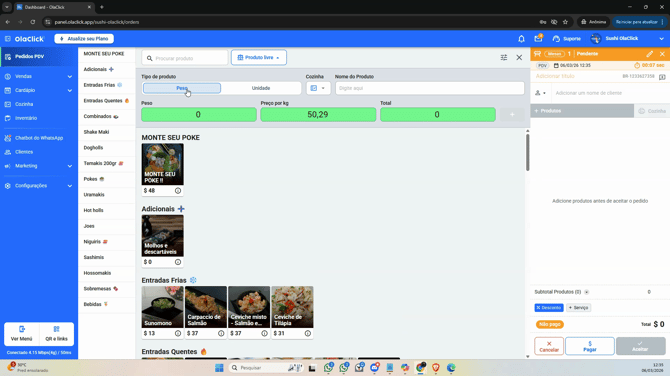
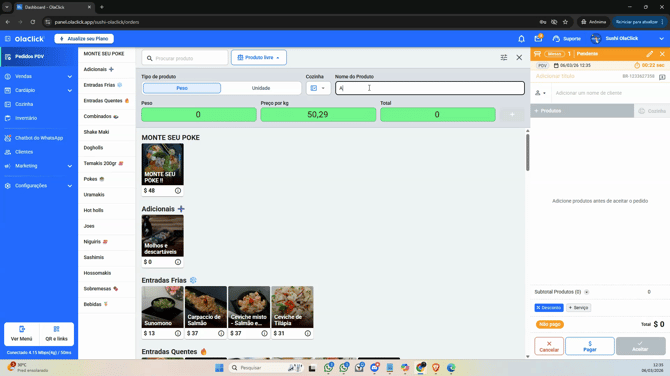
Em **Tipo de produto**, selecione **Peso**. Escolha também a cozinha onde será feito o pedido.
**Passo 5:**
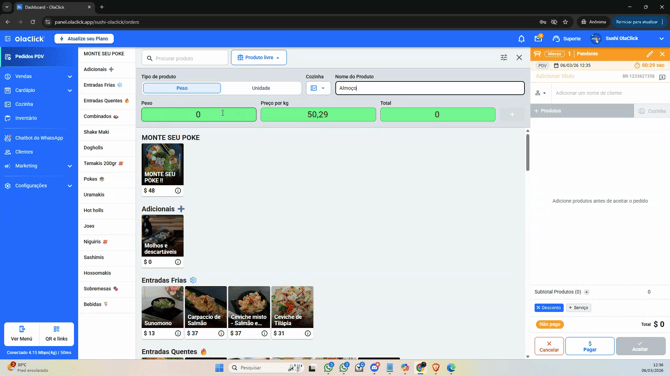
No campo **Nome do produto**, insira o item que será vendido por peso, como “Almoço”.
**Passo 6:**
Após pesar o prato ou produto, insira o valor que apareceu na balança no campo de peso.
**Passo 7:**
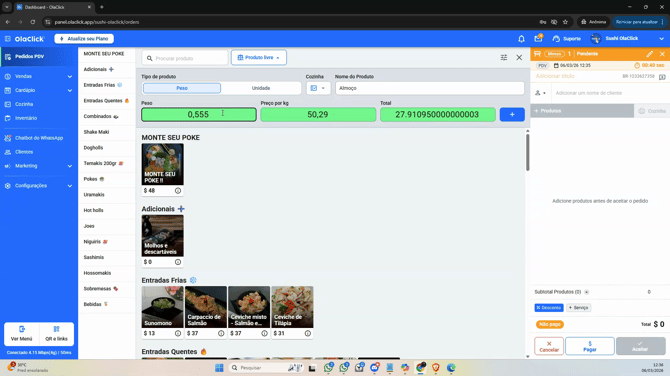
Ao lado, informe o **preço por quilo**. O sistema fará o cálculo do total automaticamente.
**Passo 8:**
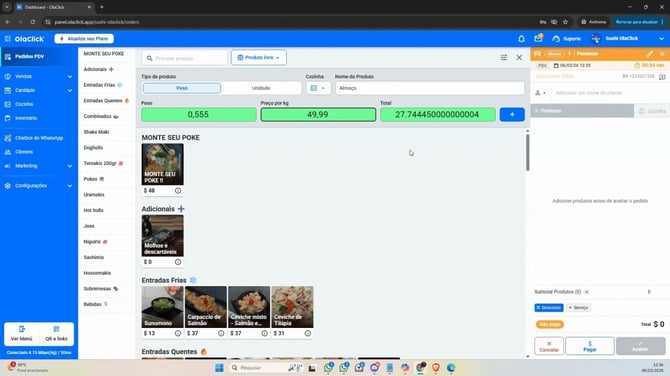
Clique no sinal de mais e depois em **Adicionar** para confirmar o pedido.
**Passo 9:**
O pedido estará criado. Utilize as opções exibidas para prosseguir conforme o atendimento: fechar conta, adicionar itens, ou outras ações disponíveis.
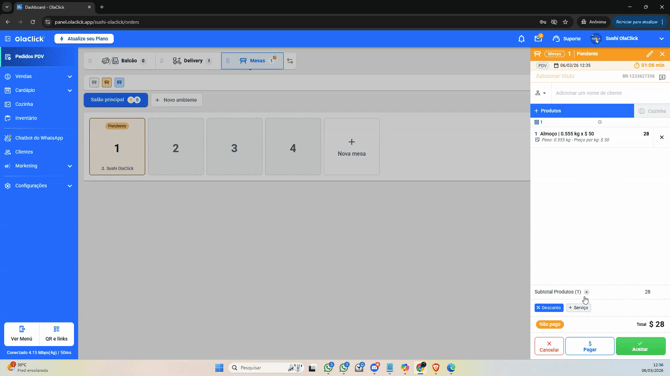
Essa funcionalidade está disponível para todos os tipos de venda: delivery feito diretamente no PDV, mesas, balcão, consumo no local e para retirada.
Garçons também têm acesso à criação de pedidos por peso, facilitando ainda mais o fluxo de trabalho.
E pronto! Agora você já sabe como criar pedidos por peso no sistema. Ajuste essa rotina ao dia a dia do seu estabelecimento e ofereça uma experiência mais ágil e eficiente para seus clientes.
Um grande abraço e até o próximo tutorial!
- [Primeiros Passos](https://help.olaclick.com/pt-br/help/primeiros-passos?hsLang=pt-br)
- [Cardápio Digital](https://help.olaclick.com/pt-br/help/card%C3%A1pio-digital?hsLang=pt-br#main-content)
- [Produtos e Categorias](https://help.olaclick.com/pt-br/help/card%C3%A1pio-digital?hsLang=pt-br#produtos-e-categorias)
- [Link e QR Code](https://help.olaclick.com/pt-br/help/card%C3%A1pio-digital?hsLang=pt-br#link-e-qr-code)
- [Personalização](https://help.olaclick.com/pt-br/help/card%C3%A1pio-digital?hsLang=pt-br#personaliza%C3%A7%C3%A3o)
- [Inventário](https://help.olaclick.com/pt-br/help/card%C3%A1pio-digital?hsLang=pt-br#invent%C3%A1rio)
- [Pedidos](https://help.olaclick.com/pt-br/help/pedidos?hsLang=pt-br)
- [Pagamentos](https://help.olaclick.com/pt-br/help/pagamentos?hsLang=pt-br#main-content)
- [Métodos de Pagamento](https://help.olaclick.com/pt-br/help/pagamentos?hsLang=pt-br#m%C3%A9todos-de-pagamento)
- [Caixas](https://help.olaclick.com/pt-br/help/pagamentos?hsLang=pt-br#caixas)
- [Impressão](https://help.olaclick.com/pt-br/help/impress%C3%A3o?hsLang=pt-br)
- [Chatbot WhatsApp](https://help.olaclick.com/pt-br/help/chatbot-whatsapp?hsLang=pt-br#main-content)
- [Conexão Básica](https://help.olaclick.com/pt-br/help/chatbot-whatsapp?hsLang=pt-br#conex%C3%A3o-b%C3%A1sica)
- [Chatbot Oficial (Meta)](https://help.olaclick.com/pt-br/help/chatbot-whatsapp?hsLang=pt-br#chatbot-oficial-meta)
- [Inteligência Artificial](https://help.olaclick.com/pt-br/help/chatbot-whatsapp?hsLang=pt-br#intelig%C3%AAncia-artificial)
- [Integrações com Delivery](https://help.olaclick.com/pt-br/help/integra%C3%A7%C3%B5es-com-delivery?hsLang=pt-br#main-content)
- [99Food](https://help.olaclick.com/pt-br/help/integra%C3%A7%C3%B5es-com-delivery?hsLang=pt-br#99food)
- [Rappi](https://help.olaclick.com/pt-br/help/integra%C3%A7%C3%B5es-com-delivery?hsLang=pt-br#rappi)
- [iFood](https://help.olaclick.com/pt-br/help/integra%C3%A7%C3%B5es-com-delivery?hsLang=pt-br#ifood)
- [Didi](https://help.olaclick.com/pt-br/help/integra%C3%A7%C3%B5es-com-delivery?hsLang=pt-br#didi)
- [Uber Eats](https://help.olaclick.com/pt-br/help/integra%C3%A7%C3%B5es-com-delivery?hsLang=pt-br#uber-eats)
- [Entregas](https://help.olaclick.com/pt-br/help/entregas?hsLang=pt-br)
- [Programa de Fidelidade](https://help.olaclick.com/pt-br/help/programa-de-fidelidade?hsLang=pt-br)
- [Publicidade e Marketing](https://help.olaclick.com/pt-br/help/publicidade-e-marketing?hsLang=pt-br)
- [Configurações](https://help.olaclick.com/pt-br/help/configura%C3%A7%C3%B5es?hsLang=pt-br)
- [Perguntas Frequentes](https://help.olaclick.com/pt-br/help/perguntas-frequentes?hsLang=pt-br)
[](https://olaclick.com)
Copyright © 2026, OlaClick Brasil Tecnologias Ltda
```json
{
"@context" : "https://schema.org",
"@type" : "VideoObject",
"caption" : {
"@type" : "MediaObject",
"contentUrl" : "https://help.olaclick.com/media-transcripts/213574495754/pt.vtt",
"inLanguage" : "pt",
"name" : "pt Captions"
},
"contentUrl" : "https://22680851.fs1.hubspotusercontent-na1.net/hubfs/22680851/PT%20-%20Pedidos%20de%20Venda%20por%20Peso.mp4",
"dateModified" : "2026-05-25T17:41:31.358Z",
"duration" : "PT1M11.006S",
"height" : 1080,
"name" : "PT - Pedidos de Venda por Peso",
"thumbnailUrl" : "https://22680851.fs1.hubspotusercontent-na1.net/hubfs/22680851/PT%20-%20Pedidos%20de%20Venda%20por%20Peso.mp4/medium.jpg",
"uploadDate" : "2026-05-25T17:41:18.547Z",
"width" : 1920
}
```