---
title: "Ajude-nos a melhorar: canais para enviar seu feedback"
description: Envie sua sugestão de melhoria para o Laklik de forma fácil e ajude o produto a evoluir com suas ideias. Veja como compartilhar feedback pelo painel oficial do sistema.
---
[Pular para o conteúdo](https://help.olaclick.com/pt-br/help/enviar-sugestões-para-olaclick#main-content)
Português - Brasil
Mostrar submenu para traduções
[](https://help.olaclick.com/pt-br/help?hsLang=pt-br)
Abrir navegação principal
Fechar navegação principal
- Português - Brasil
Mostrar submenu para traduções
- [Sugestão de melhoria](https://clientesolaclick.canny.io/sugestoes)
[Sugestão de melhoria](https://clientesolaclick.canny.io/sugestoes)
Olá, como podemos te ajudar?
- Não há sugestões porque o campo de pesquisa está em branco.
1. [Central de Ajuda](https://help.olaclick.com/pt-br/help?hsLang=pt-br)
2. [Perguntas Frequentes](https://help.olaclick.com/pt-br/help/perguntas-frequentes?hsLang=pt-br)
# Ajude-nos a melhorar: canais para enviar seu feedback
## Sugira melhorias pelo painel da OlaClick
Envie sua sugestão de melhoria para a OlaClick de forma fácil e ajude o produto a evoluir com suas ideias. Veja como compartilhar feedback pelo painel oficial do sistema.
**Passo 1:**
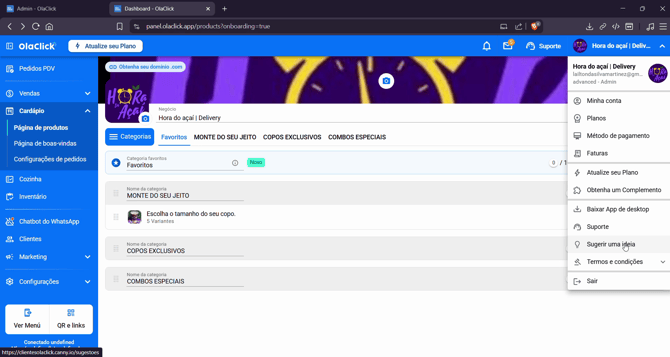
Acesse seu painel OlaClick e clique em **Sugerir uma ideia** no menu lateral.
**Passo 2:**
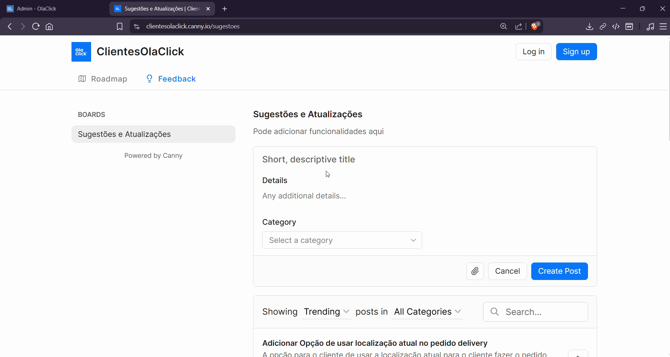
Você será redirecionado para a ferramenta Kene, onde todas as sugestões são centralizadas. Na primeira tela, veja os campos de **Título** e **Descrição**.
**Passo 3:**
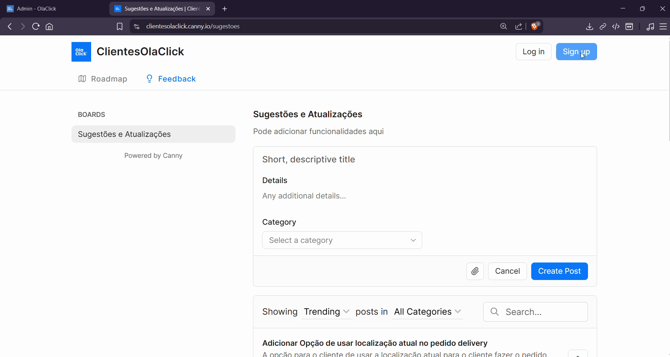
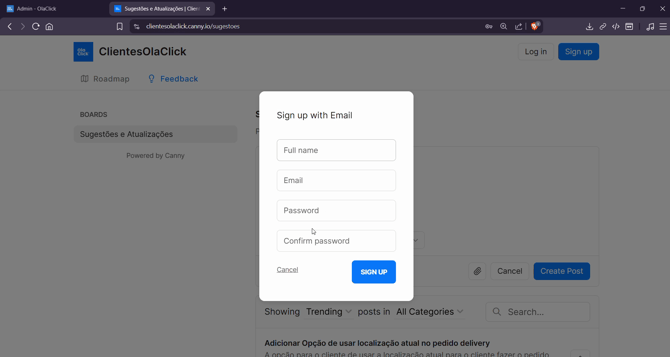
Antes de enviar sua sugestão, cadastre-se no Canon. Clique em **Sign Up**.
**Passo 4:**
Crie sua conta usando Facebook, Google, GitHub ou informe manualmente seus dados: **Nome completo**, **E-mail**, **Senha** e **Confirmação de senha**.
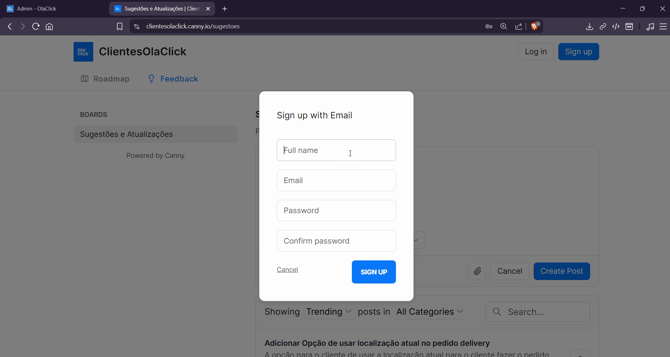
**Passo 5:** Clique em **Sign Up** para finalizar o registro.
**Passo 6:**
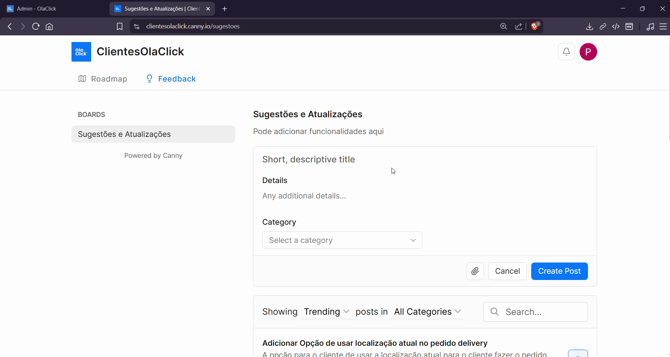
Faça login com sua conta recém-criada.
**Passo 7:**
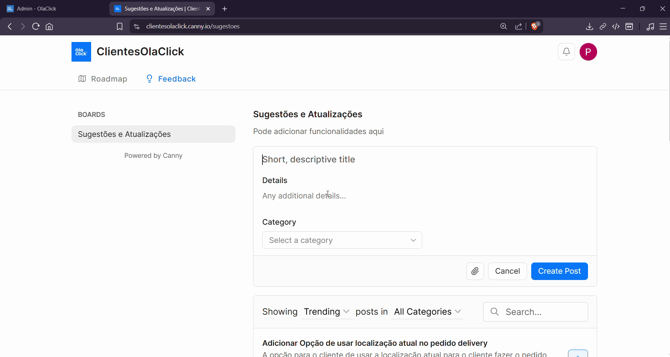
Preencha o **Título** e a **Descrição** da sua sugestão.
**Passo 8:**
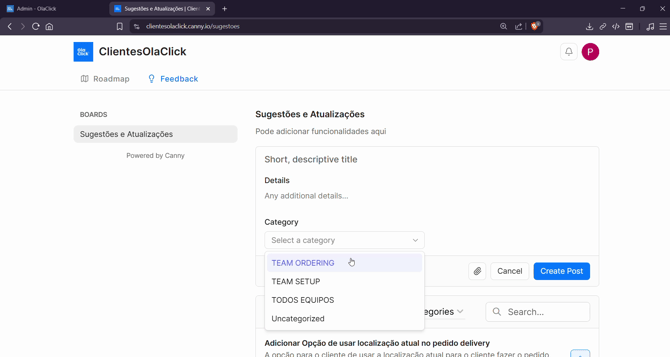
Escolha a **Categoria** da sugestão. Use "Order" para pedidos e PDV, "Team setup" para configuração do sistema ou "Todos os equipos" se ficar em dúvida.
**Passo 9:**
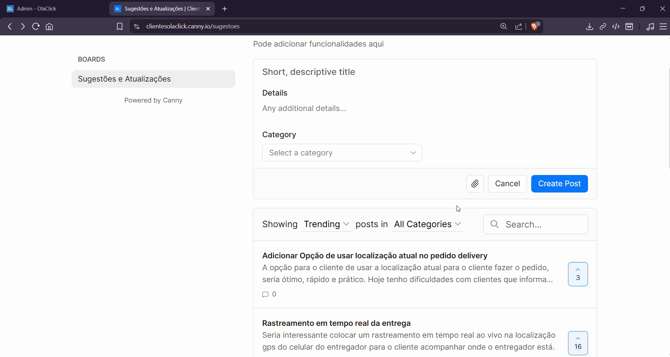
Poste sua sugestão. Ela ficará disponível no painel geral, visível para todos.
**Passo 10:**
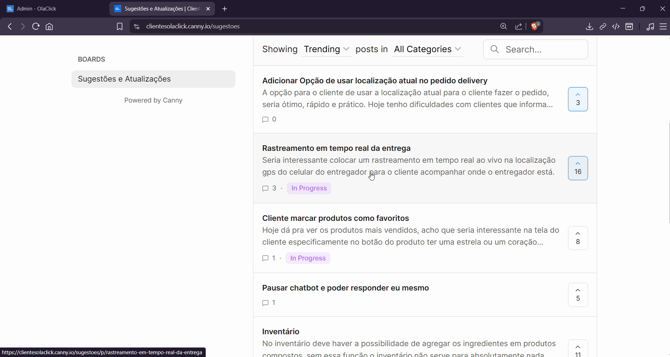
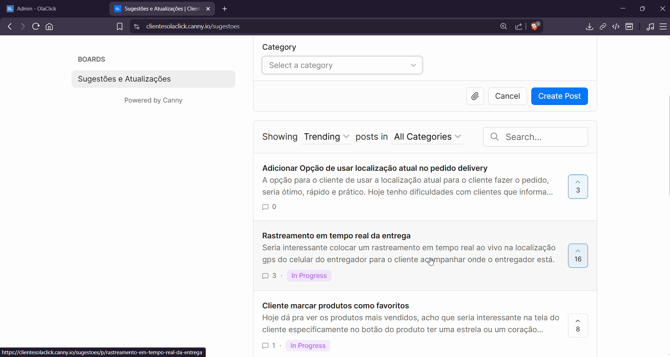
Antes de criar uma nova ideia, pesquise para ver se já existe uma sugestão semelhante. Se encontrar, clique nela.
**Passo 11:**
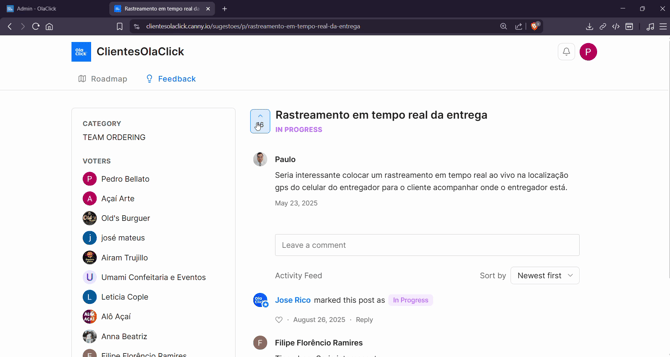
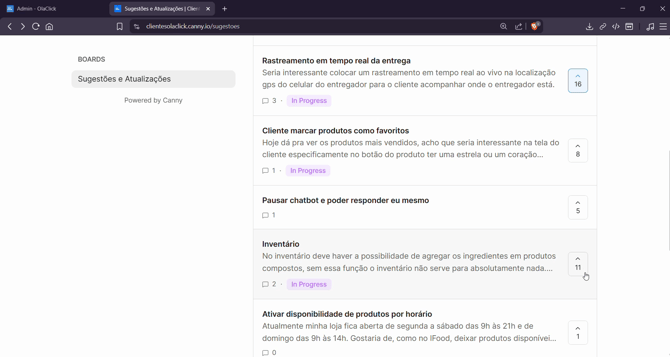
Utilize a seta para cima para votar em sugestões que achar relevantes. Mais votos aumentam a visibilidade da ideia.
**Passo 12:**
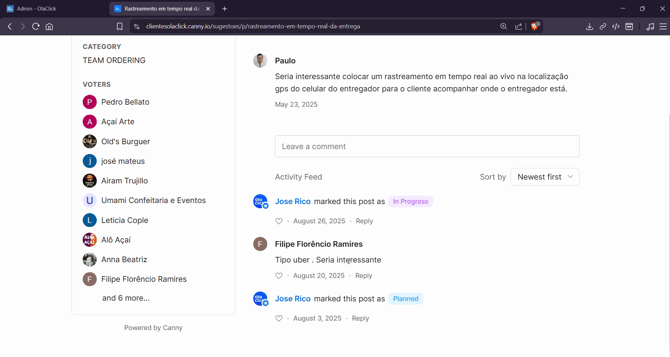
Acompanhe comentários e atualizações. Sugestões podem ser marcadas com tags como **InProgress** ou **Planned** para indicar o status.
**Passo 13:**
Use essa plataforma sempre que tiver novas ideias. O time da OlaClick monitora esse canal para priorizar melhorias e ouvir você.
Compartilhar feedback fortalece nossa comunidade e ajuda a OlaClick a evoluir cada vez mais rápido. Não deixe de postar sua sugestão — sua voz faz diferença!
- [Primeiros Passos](https://help.olaclick.com/pt-br/help/primeiros-passos?hsLang=pt-br)
- [Cardápio Digital](https://help.olaclick.com/pt-br/help/card%C3%A1pio-digital?hsLang=pt-br#main-content)
- [Produtos e Categorias](https://help.olaclick.com/pt-br/help/card%C3%A1pio-digital?hsLang=pt-br#produtos-e-categorias)
- [Link e QR Code](https://help.olaclick.com/pt-br/help/card%C3%A1pio-digital?hsLang=pt-br#link-e-qr-code)
- [Personalização](https://help.olaclick.com/pt-br/help/card%C3%A1pio-digital?hsLang=pt-br#personaliza%C3%A7%C3%A3o)
- [Inventário](https://help.olaclick.com/pt-br/help/card%C3%A1pio-digital?hsLang=pt-br#invent%C3%A1rio)
- [Pedidos](https://help.olaclick.com/pt-br/help/pedidos?hsLang=pt-br)
- [Pagamentos](https://help.olaclick.com/pt-br/help/pagamentos?hsLang=pt-br#main-content)
- [Métodos de Pagamento](https://help.olaclick.com/pt-br/help/pagamentos?hsLang=pt-br#m%C3%A9todos-de-pagamento)
- [Caixas](https://help.olaclick.com/pt-br/help/pagamentos?hsLang=pt-br#caixas)
- [Impressão](https://help.olaclick.com/pt-br/help/impress%C3%A3o?hsLang=pt-br)
- [Chatbot WhatsApp](https://help.olaclick.com/pt-br/help/chatbot-whatsapp?hsLang=pt-br#main-content)
- [Conexão Básica](https://help.olaclick.com/pt-br/help/chatbot-whatsapp?hsLang=pt-br#conex%C3%A3o-b%C3%A1sica)
- [Chatbot Oficial (Meta)](https://help.olaclick.com/pt-br/help/chatbot-whatsapp?hsLang=pt-br#chatbot-oficial-meta)
- [Inteligência Artificial](https://help.olaclick.com/pt-br/help/chatbot-whatsapp?hsLang=pt-br#intelig%C3%AAncia-artificial)
- [Integrações com Delivery](https://help.olaclick.com/pt-br/help/integra%C3%A7%C3%B5es-com-delivery?hsLang=pt-br#main-content)
- [99Food](https://help.olaclick.com/pt-br/help/integra%C3%A7%C3%B5es-com-delivery?hsLang=pt-br#99food)
- [Rappi](https://help.olaclick.com/pt-br/help/integra%C3%A7%C3%B5es-com-delivery?hsLang=pt-br#rappi)
- [iFood](https://help.olaclick.com/pt-br/help/integra%C3%A7%C3%B5es-com-delivery?hsLang=pt-br#ifood)
- [Didi](https://help.olaclick.com/pt-br/help/integra%C3%A7%C3%B5es-com-delivery?hsLang=pt-br#didi)
- [Uber Eats](https://help.olaclick.com/pt-br/help/integra%C3%A7%C3%B5es-com-delivery?hsLang=pt-br#uber-eats)
- [Entregas](https://help.olaclick.com/pt-br/help/entregas?hsLang=pt-br)
- [Programa de Fidelidade](https://help.olaclick.com/pt-br/help/programa-de-fidelidade?hsLang=pt-br)
- [Publicidade e Marketing](https://help.olaclick.com/pt-br/help/publicidade-e-marketing?hsLang=pt-br)
- [Configurações](https://help.olaclick.com/pt-br/help/configura%C3%A7%C3%B5es?hsLang=pt-br)
- [Perguntas Frequentes](https://help.olaclick.com/pt-br/help/perguntas-frequentes?hsLang=pt-br)
[](https://olaclick.com)
Copyright © 2026, OlaClick Brasil Tecnologias Ltda