---
title: Como configuro o horário do meu restaurante?
description: Configure o horário de funcionamento de seu restaurante na OlaClick
---
[Pular para o conteúdo](https://help.olaclick.com/pt-br/help/como-configuro-o-hor%C3%A1rio-do-meu-neg%C3%B3cio#main-content)
- [Português - Brasil](https://help.olaclick.com/pt-br/help/como-configuro-o-hor%C3%A1rio-do-meu-neg%C3%B3cio)
- [Español](https://help.olaclick.com/es/help/como-configurar-el-horario-en-mi-panel)
Português - Brasil
Mostrar submenu para traduções
[](https://help.olaclick.com/pt-br/help?hsLang=pt-br)
Abrir navegação principal
Fechar navegação principal
- - [Português - Brasil](https://help.olaclick.com/pt-br/help/como-configuro-o-hor%C3%A1rio-do-meu-neg%C3%B3cio)
- [Español](https://help.olaclick.com/es/help/como-configurar-el-horario-en-mi-panel)
Português - Brasil
Mostrar submenu para traduções
- [Sugestão de melhoria](https://clientesolaclick.canny.io/sugestoes)
[Sugestão de melhoria](https://clientesolaclick.canny.io/sugestoes)
Olá, como podemos te ajudar?
- Não há sugestões porque o campo de pesquisa está em branco.
1. [Central de Ajuda](https://help.olaclick.com/pt-br/help?hsLang=pt-br)
2. [Configurações](https://help.olaclick.com/pt-br/help/configura%C3%A7%C3%B5es?hsLang=pt-br)
# Como configuro o horário do meu restaurante?
## Configure o horário de funcionamento de seu restaurante na OlaClick
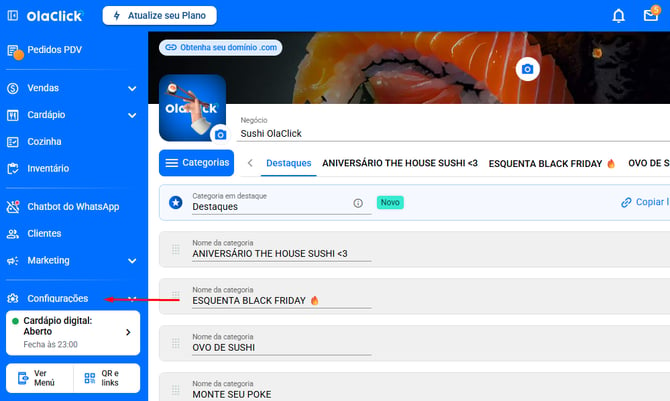
Passo 1: Clique em Configurações.
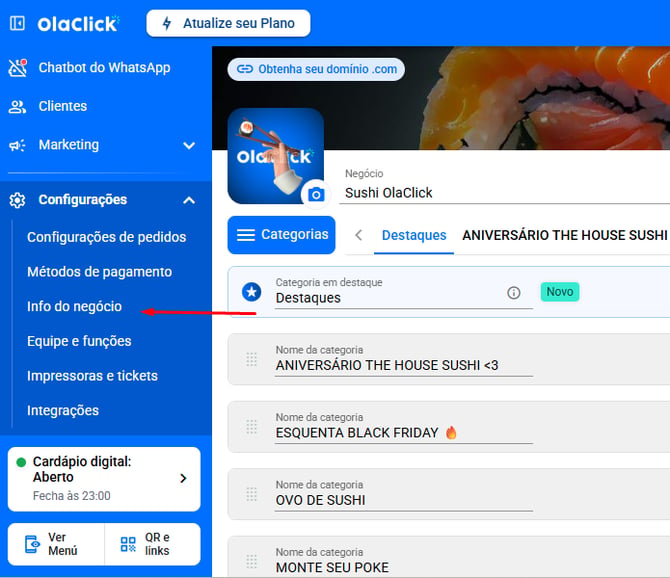
Passo 2: Clique em Info do negócio.
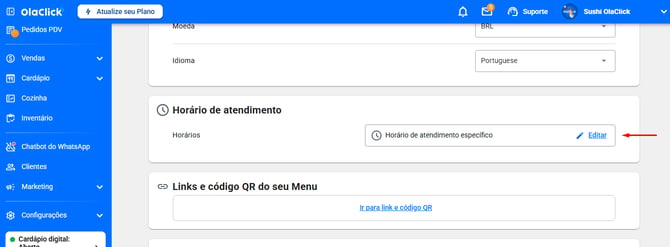
Passo 3: Em horários de atendimento, clique em Editar.
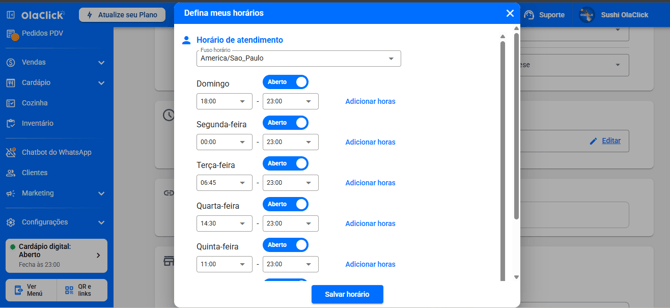
Passo 4: Ajusteos horáriosde seu restaurante,e apósconfigurado clique em Salvar Horário.
- [Primeiros Passos](https://help.olaclick.com/pt-br/help/primeiros-passos?hsLang=pt-br)
- [Cardápio Digital](https://help.olaclick.com/pt-br/help/card%C3%A1pio-digital?hsLang=pt-br#main-content)
- [Produtos e Categorias](https://help.olaclick.com/pt-br/help/card%C3%A1pio-digital?hsLang=pt-br#produtos-e-categorias)
- [Link e QR Code](https://help.olaclick.com/pt-br/help/card%C3%A1pio-digital?hsLang=pt-br#link-e-qr-code)
- [Personalização](https://help.olaclick.com/pt-br/help/card%C3%A1pio-digital?hsLang=pt-br#personaliza%C3%A7%C3%A3o)
- [Inventário](https://help.olaclick.com/pt-br/help/card%C3%A1pio-digital?hsLang=pt-br#invent%C3%A1rio)
- [Pedidos](https://help.olaclick.com/pt-br/help/pedidos?hsLang=pt-br)
- [Pagamentos](https://help.olaclick.com/pt-br/help/pagamentos?hsLang=pt-br#main-content)
- [Métodos de Pagamento](https://help.olaclick.com/pt-br/help/pagamentos?hsLang=pt-br#m%C3%A9todos-de-pagamento)
- [Caixas](https://help.olaclick.com/pt-br/help/pagamentos?hsLang=pt-br#caixas)
- [Impressão](https://help.olaclick.com/pt-br/help/impress%C3%A3o?hsLang=pt-br)
- [Chatbot WhatsApp](https://help.olaclick.com/pt-br/help/chatbot-whatsapp?hsLang=pt-br#main-content)
- [Conexão Básica](https://help.olaclick.com/pt-br/help/chatbot-whatsapp?hsLang=pt-br#conex%C3%A3o-b%C3%A1sica)
- [Chatbot Oficial (Meta)](https://help.olaclick.com/pt-br/help/chatbot-whatsapp?hsLang=pt-br#chatbot-oficial-meta)
- [Inteligência Artificial](https://help.olaclick.com/pt-br/help/chatbot-whatsapp?hsLang=pt-br#intelig%C3%AAncia-artificial)
- [Integrações com Delivery](https://help.olaclick.com/pt-br/help/integra%C3%A7%C3%B5es-com-delivery?hsLang=pt-br#main-content)
- [99Food](https://help.olaclick.com/pt-br/help/integra%C3%A7%C3%B5es-com-delivery?hsLang=pt-br#99food)
- [Rappi](https://help.olaclick.com/pt-br/help/integra%C3%A7%C3%B5es-com-delivery?hsLang=pt-br#rappi)
- [iFood](https://help.olaclick.com/pt-br/help/integra%C3%A7%C3%B5es-com-delivery?hsLang=pt-br#ifood)
- [Didi](https://help.olaclick.com/pt-br/help/integra%C3%A7%C3%B5es-com-delivery?hsLang=pt-br#didi)
- [Uber Eats](https://help.olaclick.com/pt-br/help/integra%C3%A7%C3%B5es-com-delivery?hsLang=pt-br#uber-eats)
- [Entregas](https://help.olaclick.com/pt-br/help/entregas?hsLang=pt-br)
- [Programa de Fidelidade](https://help.olaclick.com/pt-br/help/programa-de-fidelidade?hsLang=pt-br)
- [Publicidade e Marketing](https://help.olaclick.com/pt-br/help/publicidade-e-marketing?hsLang=pt-br)
- [Configurações](https://help.olaclick.com/pt-br/help/configura%C3%A7%C3%B5es?hsLang=pt-br)
- [Perguntas Frequentes](https://help.olaclick.com/pt-br/help/perguntas-frequentes?hsLang=pt-br)
[](https://olaclick.com)
Copyright © 2026, OlaClick Brasil Tecnologias Ltda